

Summer baby shower ideas from lemon and berry to coastal crawfish boil, Mamma Mia, olive, matcha and Baby-Q themes.

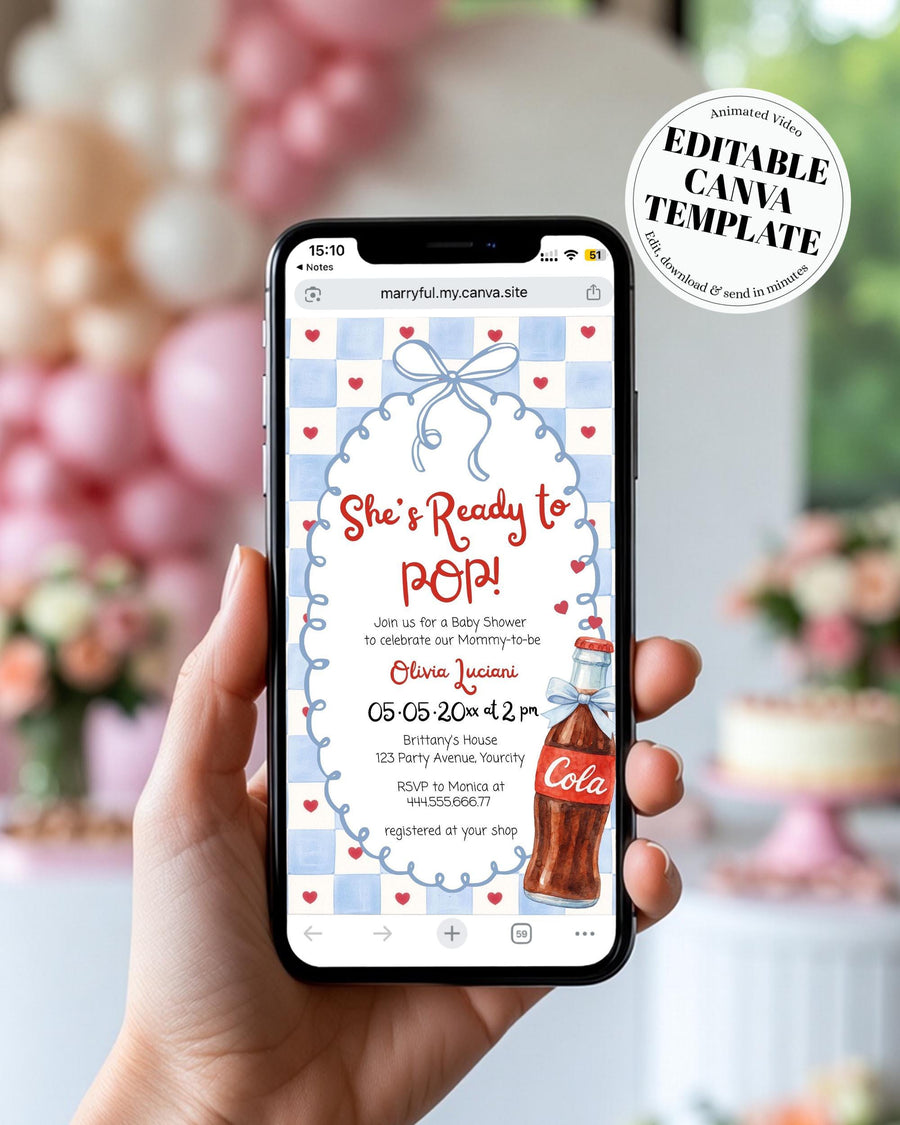


Ready to Pop Baby Shower Video Invitation Template, Blue Animated Canva Invite + Music 034SS-BSINV
Tax included.
Try it before you buy
Open the free demo and type your own names in. What you edit is exactly what you get.
Everything matches
The whole set is drawn from this one design, so anything you add later lines up.
It’s me, Sarah, who answers
Write to me and you hear back within 1–2 business days. Not a help desk.
Yours in a minute, edited on your phone
It opens the moment you pay, right in your browser. Print it, or send it to guests by text.
Posting paper invitations? Allow about three weeks: a few days to get them printed, and two weeks' notice for your guests.
22,000+ orders on Etsy · rated {avg} from {reviews} reviews
What you get
- 1 Animated Video Invitation
- Size: 1080 x 1920 px
- Length: approx. 18 seconds
- Music included
- This template is designed for phones and digital sharing only.
- Not for printing.
Sizes are ready to print, and detailed instructions come with every order. Everything opens right after purchase.

Ready to Pop Baby Shower Video Invitation Template, Blue Animated Canva Invite + Music 034SS-BSINV
€15,00
What our customers say
4.9
Based on 1,701 verified Etsy reviews
Throw the cutest “Ready to Pop” baby shower—this blue animated video invitation template is designed for phones (1080x1920) and comes with music included. Digital Canva template only—no physical item shipped. Personalize your details in Canva, download your final video, and share instantly by text, email, or social media for a quick, modern baby shower invite with a retro soda pop feel.
This is an animated video invitation, made to send straight to your guests' phones. There is nothing to print.
1. Open it in Canva
After you order, you'll get a link to personalise it in Canva. First time using Canva? Start here: How to Access and Edit Your Canva Template.
2. Personalise
Edit the names, date and details to suit your celebration, and watch the timing as you go so every scene reads comfortably.
3. Download as a video and send
Download your invitation as an MP4 video, then share it by text, email, WhatsApp or social, wherever your guests already are.
- You cannot break it. It is your own copy in Canva, so start again whenever you like.
- Send it straight from your phone. Download the video and share it by text or WhatsApp.
- There is no time limit. Your copy sits in your own Canva account, so you can come back to it whenever you like.
Print & send
Send it, do not print it
Download your finished video as an MP4 and share it by text, email, WhatsApp or on social.
Want paper as well?
Message me and I will help you put a matching printed set together.
Have questions?
Can I change the size?
The sizes are fixed, so a 5x7 invitation stays 5x7. That is what keeps it printing cleanly. The wording, fonts, colours and photos are all yours to change.
How long can I access my template?
There is no time limit. Your copy sits in your own Canva account, so you can come back to it whenever you like.
What if something is not right with my order?
Email me at office@marryful.org and I will fix it. Personalised files cannot be returned, but I have never left anyone stuck.
Editing & printing guides

Seven baby shower themes for 2026, each with the colors, the decor and the matching printables. Pick the one that sounds like the parents and the rest falls into place.

Bought a Canva template? Here's how to open it, save your own copy, and start editing.
![Woman receiving her printed templates from the postman [AI]](http://marryful.org/cdn/shop/articles/Prints_of_love_package_b0f84256-c190-40d0-8d2f-98a18707b81f.jpg?v=1780662238&width=1)
Fast turnaround, free shipping and a marryful discount. You download, upload and order.
![Woman editing her template on a laptop in Corjl. [AI]](http://marryful.org/cdn/shop/articles/edit_in_Corjl_f45d2de7-a487-4400-bac0-f65744c5e777.jpg?v=1780662260&width=1)
Change the fonts, colours, photos, illustrations and more in Corjl, and make the template your own.

marryful templates are set up in US sizes, but they print in EU sizes too. Here's how.

Skip the post box and send it by text, email or Paperless Post, with envelopes and RSVP tracking.
![Woman downloading her Corjl Template on a Laptop [AI]](http://marryful.org/cdn/shop/articles/How_to_download_blog_image_56465207-d683-4aa2-9353-e7f2cb3f2a6c.jpg?v=1780662120&width=1)
Pick the right format, grab every page and print at 100%, whether you print at home or with a pro.