

The most-saved wedding sign of 2026: what it is, the bestselling motifs and how to make your own from an editable Canva template.

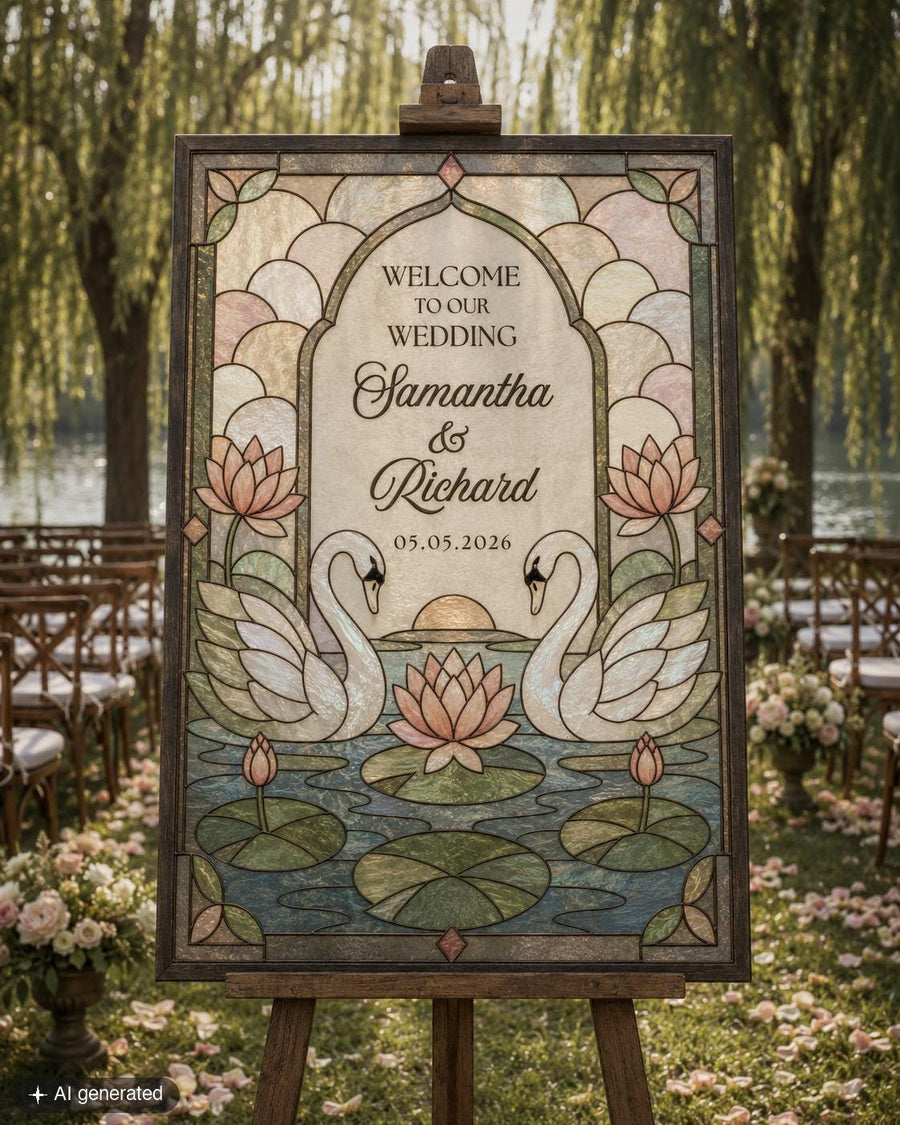


Swan Stained Glass Wedding Welcome Sign Template, Lake Garden Acrylic Printable
Tax included.
Try it before you buy
Open the free demo and type your own names in. What you edit is exactly what you get.
Everything matches
The whole set is drawn from this one design, so anything you add later lines up.
It’s me, Sarah, who answers
Write to me and you hear back within 1–2 business days. Not a help desk.
Yours in a minute, edited on your phone
It opens the moment you pay, right in your browser. Print it, or send it to guests by text.
Posting paper invitations? Allow about three weeks: a few days to get them printed, and two weeks' notice for your guests.
22,000+ orders on Etsy · rated {avg} from {reviews} reviews
What you get
- Faux Glass Sign Template in 3 sizes:
- 16x20''
- 18x24''
- 24x36''
Sizes are ready to print, and detailed instructions come with every order. Everything opens right after purchase.

Swan Stained Glass Wedding Welcome Sign Template, Lake Garden Acrylic Printable
€15,00
What our customers say
4.9
Based on 1,727 verified Etsy reviews
This neutral swan wedding welcome sign template is perfect for a lake wedding, garden ceremony, or romantic outdoor celebration. The digital Canva template is editable and designed as a tracing guide for DIY faux stained glass acrylic or glass painting. Edit the text, download instantly, and print for your project. No physical item is shipped.
You print this design and trace it. There is no glass-cutting, and everything you need to pull it off comes with your order.
1. Open it in Canva
Your design opens in Canva, which is free to use, in all three sizes. New to Canva? My beginner's guide walks you through it click by click: How to Access and Edit Your Canva Template.
2. Make it yours
Add your names, your date or your table numbers, and change the colours. All the text is editable.
3. Print it at home
My tile-print tool splits the design across ordinary sheets, so an everyday printer handles even the largest size. Prefer a local print shop? That works too.
4. Trace it
Tape the print behind clear acrylic or glass and trace the lines with a paint pen. The toolkit shows you how to build the structure and whether to paint the front or the back.
5. Your toolkit
Every order includes the Faux Stained Glass Toolkit, my private password-protected site: follow-along instructions, the tile-print and mirror tool, a colour-mixing cheat sheet so your colours come out right first time, and the exact paints and materials I use, linked ready to buy. The full list is below.
- You print it at home. My tile-print tool splits the design across ordinary sheets, so a normal printer is all you need.
- You are not left to work it out. The toolkit walks you through it, with the paints I use listed and a colour-mixing sheet.
- There is no time limit. Your copy sits in your own Canva account, so you can come back to it whenever you like.
Print & send
What I recommend
Print it at home
My tile-print tool splits the design across ordinary sheets, so an everyday printer handles even the 24x36 size. Plain paper is perfect, because you are only tracing it. A local print shop works too if you would rather.
Everything you need comes with it
The Faux Stained Glass Toolkit is my private password-protected site, and the password comes with your order. Inside: follow-along instructions from blank canvas to finished piece, the tile-print and mirror tool, and how to build the structure and whether to paint the front or the back.
And so you buy the right paint once
A colour-mixing cheat sheet so your colours come out right the first time, with nothing wasted. Plus the exact paints and materials I use, linked ready to buy.
Supply links are US, so availability can vary elsewhere.
Have questions?
Do I need a big printer?
No. My tile-print tool splits the design across ordinary sheets, so a normal home printer handles even the 24x36 size. You are only tracing the print, so plain paper is fine.
I have never done this before. Can I still do it?
Yes, that is who the toolkit is written for. It starts at a blank canvas and takes you to a finished piece, and there is a Canva beginner's guide if you have never opened Canva either.
Can I change the size?
Your design comes in all three sizes, 16x20, 18x24 and 24x36, so you pick the one you need. Within each size the layout is fixed, which is what keeps it printing cleanly. The wording, fonts, colours and photos are all yours to change.
How long can I access my template?
There is no time limit. Your copy sits in your own Canva account, so you can come back to it whenever you like.
What if something is not right with my order?
Email me at office@marryful.org and I will fix it. Personalised files cannot be returned, but I have never left anyone stuck.
Editing & printing guides

Bought a Canva template? Here's how to open it, save your own copy, and start editing.
![Woman receiving her printed templates from the postman [AI]](http://marryful.org/cdn/shop/articles/Prints_of_love_package_b0f84256-c190-40d0-8d2f-98a18707b81f.jpg?v=1780662238&width=1)
Fast turnaround, free shipping and a marryful discount. You download, upload and order.
![Woman editing her template on a laptop in Corjl. [AI]](http://marryful.org/cdn/shop/articles/edit_in_Corjl_f45d2de7-a487-4400-bac0-f65744c5e777.jpg?v=1780662260&width=1)
Change the fonts, colours, photos, illustrations and more in Corjl, and make the template your own.

marryful templates are set up in US sizes, but they print in EU sizes too. Here's how.

Skip the post box and send it by text, email or Paperless Post, with envelopes and RSVP tracking.
![Woman downloading her Corjl Template on a Laptop [AI]](http://marryful.org/cdn/shop/articles/How_to_download_blog_image_56465207-d683-4aa2-9353-e7f2cb3f2a6c.jpg?v=1780662120&width=1)
Pick the right format, grab every page and print at 100%, whether you print at home or with a pro.